
CLI
OpenKey CLI (openkey) ان ڈویلپرز کے لیے command-line interface ہے جو secrets، API tokens، SSH keys اور .env material OpenKey vault میں رکھتے ہیں۔ یہ password generation کے لیے مکمل offline چل سکتی ہے، unlocked OpenKey desktop app سے local native bridge پر بات کر سکتی ہے، اور اختیاری طور پر self-hosted sync server پر authenticate ہو کر ciphertext pull اور مختصر مدتی CLI session حاصل کر سکتی ہے۔
Node.js 20+ درکار ہے۔
آرکیٹیکچر
نیچے کا diagram دکھاتا ہے کون کس سے بات کرتا ہے۔ Password generation offline رہتی ہے۔ Vault commands unlocked desktop app کو ترجیح دیتے ہیں۔ Server sync اختیاری ہے۔
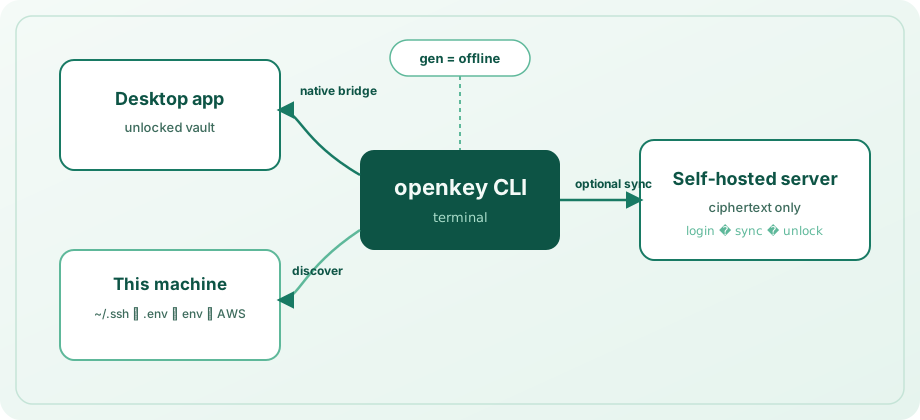
| موڈ | کب لاگو | کیا کر سکتی ہے |
|---|---|---|
| Offline | ہمیشہ | gen — بغیر app، بغیر server |
| Native bridge | اس مشین پر desktop app unlocked | Secrets CRUD، discovery import، secrets اور logins میں search/get/copy |
| CLI session | login + eval $(openkey unlock) کے بعد | local ciphertext cache پر وہی vault operations؛ sync server سے pull |
vault command backend کیسے چنتا ہے
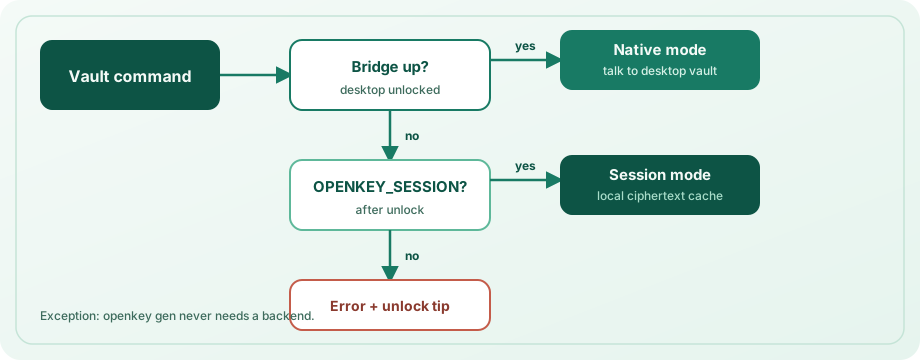
- اگر desktop bridge جواب دے → native mode (ترجیحی؛ server registration نہیں)۔
- ورنہ اگر
OPENKEY_SESSIONset اور valid ہو → session mode (local cache / server-backed material)۔ - ورنہ → vault والی commands fail، app unlock یا
eval $(openkey unlock)چلانے کی tip۔
Bridge کنکشنز صرف local machine سے قبول کرتا ہے اور صرف جب vault unlocked ہو۔ Unix پر known OpenKey paths کے تحت socket (OPENKEY_NATIVE_SOCKET سے override)۔ Windows پر %LOCALAPPDATA%\OpenKey\ کے تحت localhost port file (OPENKEY_NATIVE_PORT سے override)۔
Install
cd openkey_cli
npm install
npm run build
npm link          # optional: puts `openkey` on your PATH
بغیر linking:
npx tsx src/cli.ts --help
# after build:
node dist/cli.js --help
Verify:
openkey --version
openkey status
Configuration اور storage
Local CLI state platform config directory میں (file mode 600 جب supported):
| Platform | Path |
|---|---|
| macOS | ~/Library/Application Support/OpenKey/config.json |
| Linux | ~/.config/openkey/config.json (یا $XDG_CONFIG_HOME/openkey/) |
| Windows | %APPDATA%\OpenKey\config.json |
فائل میں ہو سکتا ہے: server URL، email، access/refresh tokens، salt اور KDF params، wrapped vault key، session lock duration، server revision، اور sync کے بعد entries/collections کا ciphertext cache۔ Master password plaintext میں store نہیں۔
config commands
openkey config set-server https://openkey.example.com
openkey config show
openkey config set-lock 30 # session lifetime in minutes (1–1440, default 15)set-serverکوhttp://یاhttps://سے شروع ہونے والا URL چاہیے (trailing slash ہٹایا جاتا ہے)۔- پہلے set سے پہلے default server URL:
http://localhost:8000۔
Global options
| Flag | Effect |
|---|---|
--json | Scripting کے لیے stdout پر machine-readable JSON |
--help / --version | Help اور version |
Commander globals استعمال کرتے وقت --json subcommand سے پہلے رکھیں، مثلاً openkey --json status۔
Password generation (gen)
مکمل offline۔ App یا server نہیں چاہیے۔
openkey gen
openkey gen -l 24 --no-symbols
openkey gen -l 32 -a -c
openkey --json gen -l 20| Option | Description | Default |
|---|---|---|
-l, --length <n> | Length (عملی range 4–64) | 20 |
--no-upper | Uppercase حروف exclude | off |
--no-lower | Lowercase حروف exclude | off |
--no-digits | Digits exclude | off |
--no-symbols | Symbols exclude | off |
-a, --avoid-ambiguous | مبہم characters Il1O0o avoid | off |
-c, --copy | Print کی بجائے clipboard پر copy | off |
-c کے ساتھ human mode confirmation print؛ JSON mode { "copied": true, "length": N }۔ -c کے بغیر password print (یا JSON mode میں { "password": "..." })۔
Status اور hygiene
openkey status
openkey forget
status server URL، email، login state، bridge availability، unlock mode (native / session)، باقی session time، cached entry count بتاتا ہے۔
forget local CLI config اور cached ciphertext مٹاتا ہے۔ Desktop app vault کے اندر secrets delete نہیں۔ Server mode استعمال کریں تو forget کے بعد دوبارہ config set-server / login۔
Developer secrets (secret)
Secrets vault کے reserved Secrets area (__dev_secrets__) میں، device (machine label؛ default hostname) کے مطابق گروپ۔ Commands کو desktop app unlocked یا valid OPENKEY_SESSION چاہیے۔
Kinds
| Kind | Typical use | Notes |
|---|---|---|
apiToken | PAT، API keys | Default |
sshKey | Private keys | --file / --public-key-file ترجیح |
envSnippet | مکمل .env bodies | --file ترجیح |
other | Catch-all | — |
ssh، api، token، env، .env جیسے aliases اوپر والے kinds میں normalize۔
secret add
openkey secret add --name "GitHub PAT" --kind apiToken --secret ghp_...
openkey secret add -n "deploy key" -k sshKey -f ~/.ssh/id_ed25519 \
  --public-key-file ~/.ssh/id_ed25519.pub -H git.example.com -u git
openkey secret add -n "acme .env" -k envSnippet -f ./apps/api/.env -d laptop| Option | Description |
|---|---|
-n, --name | Display name (required) |
-k, --kind | sshKey | apiToken | envSnippet | other |
-s, --secret | Inline secret value (- stdin پڑھتا ہے) |
-f, --file | Secret body file سے پڑھیں |
--stdin | Secret stdin سے (argv میں tokens سے بہتر) |
-u, --username | Optional username |
-H, --host | Optional host |
-d, --device | Device collection label (default: hostname) |
--public-key / --public-key-file | SSH public key |
--passphrase | Key passphrase |
--notes | Free-form notes |
--secret، --file یا --stdin (non-empty) دیں۔ Created records UUID return۔
printf '%s' "$TOKEN" | openkey secret add -n "CI token" --stdinsecret list / get / copy / rm / update / export / devices
openkey secret list
openkey secret list -d laptop -k apiToken
openkey secret get "GitHub"
openkey secret copy ghp
openkey secret update "GitHub PAT" --secret ghp_new...
printf '%s' "$TOKEN" | openkey secret update "GitHub PAT" --stdin
openkey secret export -d laptop -o .env.local
openkey secret export --format exports   # for eval
openkey secret devices
openkey secret rm "old token" -y- list — UUID prefix، name، kind، device، masked secret کی table۔ اختیاری
-d/--deviceاور-k/--kindfilters۔ - get / copy / rm / update — name، host یا UUID prefix سے match۔ کئی substrings match ہوں تو exact name/title، host یا unique UUID prefix (≥4 chars) جیتتا ہے؛ ورنہ command candidates کے ساتھ error۔
- update — صرف آپ کے flags patch (
--name،--secret/--file/--stdin،--kind،--device، …)۔ Desktop bridgeupdateSecrethandler (اس release والی OpenKey app) یا CLI session چاہیے۔ - export — secrets dotenv (
KEY=value؛envSnippetbodies inline) یا--format exportsshell lines۔-osupported ہو تو mode-600file۔ - devices — device collection labels اور counts۔
- get plaintext print (یا
--jsonmode میں full JSON object)۔ - copy plaintext clipboard پر۔
- rm
-y/--yesکے بغیر prompt۔
Shell میں secrets inject (env / run)
# Print export lines for eval (NAME or NAME=query)
eval $(openkey env DATABASE_URL)
eval $(openkey env DB=DATABASE_URL GH="GitHub PAT")

# Or run a child process with secrets in its environment
openkey run -e DATABASE_URL -e GH="GitHub PAT" -- npm start| Form | Meaning |
|---|---|
NAME | Env var NAME؛ vault item اس name سے lookup |
NAME=query | Env var NAME؛ query سے lookup (name / host / UUID) |
env پر --json objects env، query، name، uuid، value کے ساتھ۔ --raw ایک plaintext value (بالکل ایک binding)۔
Discovery (discover)
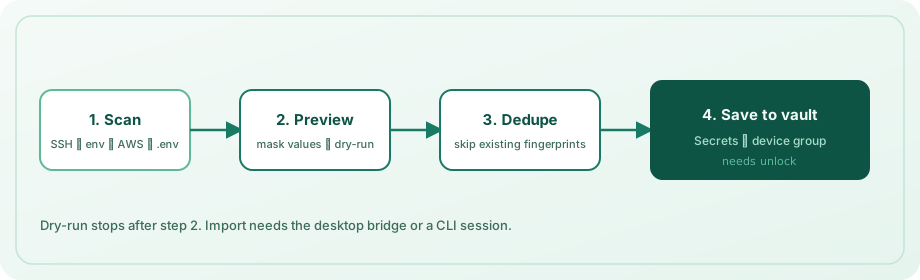
یہ مشین scan کر کے نئے secrets device group میں import۔ Vault میں موجود values کے خلاف dedupe (kind + name + content fingerprint)۔
openkey discover --dry-run
openkey discover -y
openkey discover -d workstation -p ~/src/acme -p ~/src/labs --depth 3
openkey discover --no-aws --no-env-vars| Option | Description | Default |
|---|---|---|
-d, --device | Device collection name | hostname |
-p, --path <dir> | .env walk کے لیے project root(s) (repeatable) | cwd |
--depth <n> | .env کے لیے max directory depth | 4 |
--no-ssh | ~/.ssh private keys skip | scan on |
--no-env-files | .env / .env.* files skip | scan on |
--no-env-vars | Process environment skip | scan on |
--no-aws | ~/.aws/credentials skip | scan on |
--no-gh | GitHub CLI hosts.yml tokens skip | scan on |
--no-docker | ~/.docker/config.json registry auth skip | scan on |
--dry-run | صرف list؛ save نہیں | off |
-y, --yes | Interactive confirm کے بغیر import | off |
کیا scan ہوتا ہے
- SSH —
~/.sshکے تحت private keys (known_hosts،authorized_keys،config،.pubskip)؛ موجود ہو تو sibling.pubattach۔ - Environment variables — معروف names (
GITHUB_TOKEN،OPENAI_API_KEY،DATABASE_URL، …) اور secret-like suffixes؛PATH،HOME،OPENKEY_SESSION،OPENKEY_PASSWORDوغیرہ skip۔ - AWS —
~/.aws/credentialsمیں profiles۔ - GitHub CLI —
~/.config/gh/hosts.ymlمیںoauth_token/tokenentries۔ - Docker —
~/.docker/config.jsonسے decodedauths۔ - **
.envfiles** — roots سے walk،node_modules،.git،dist`، virtualenvs وغیرہ skip؛ size اور file-count limits۔
Dry-run vault locked ہونے پر بھی (صرف listing)۔ Save کے لیے bridge یا session unlock۔ پہلے import شدہ secrets skipped report۔
Secrets اور logins میں search
یہ commands developer secrets اور login entries search:
openkey search github
openkey get "GitHub"
openkey get "GitHub" --field username
openkey copy api.example.com --field totp
openkey totp "GitHub" -c
openkey logins| Command | Output |
|---|---|
search <query> | Masked table (یا JSON previews)؛ TOTP availability |
get <query> | Best-match field (--field password|username|url|totp|notes) |
copy <query> | Field clipboard copy (45s میں auto-clear؛ --keep disable) |
totp <query> | Live TOTP code (-c copy، -w Ctrl+C تک watch) |
logins | Logins username / URL / TOTP flag |
doctor | Node، config permissions، bridge، session، server /health، clipboard diagnose |
مبہم substring matches exact name/title، host یا unique UUID prefix ترجیح؛ ورنہ UUID، kind، label — query refine۔ صرف Secrets section چاہیں تو secret get / secret copy۔
secret set name + device سے upsert (create یا update)۔ sync --push pull سے پہلے local ciphertext cache push۔
اختیاری self-hosted server
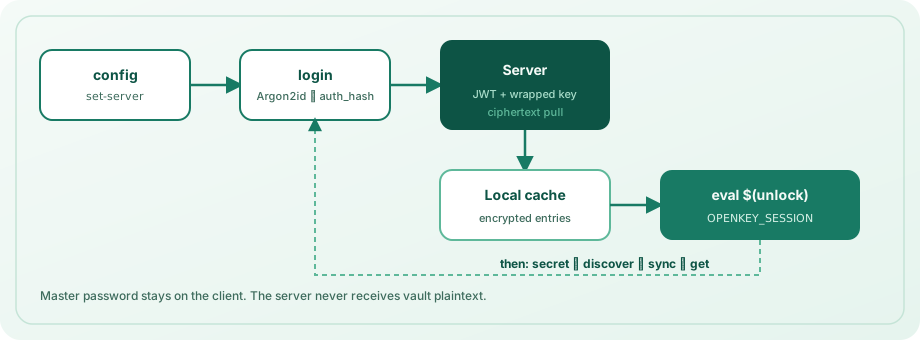
جب desktop app مشین پر نہیں (مثلاً sync سے phone-only vault access)، یا CLI ciphertext cache چاہیں۔
openkey config set-server http://localhost:8000
openkey login --email [email protected]
eval $(openkey unlock)
openkey sync
Server install: سرور انسٹال۔
Authentication flow
login— email (یا-e) اور master password (یاOPENKEY_PASSWORD) prompt۔ Salt/KDF کے لیے prelogin، Argon2id سےauth_hashderive، JWTs، wrapped vault key material fetch، unwrap سے password verify، پھر local cache میں ciphertext pull۔ Master password CLI flag کبھی نہ بھیجیں۔unlock— vault key دوبارہ derive، server reachable ہو تو tokens/sync refresh،OPENKEY_SESSIONکے لیے shell export print (eval $(openkey unlock))۔ Options:-e/--email،--raw(صرف token)۔ JSON mode session fields۔lock—unset OPENKEY_SESSIONprint (یا JSON hint) تاکہeval $(openkey lock)۔logout— access/refresh tokens clear؛ local ciphertext cache رکھتا ہے۔ Session env clear کے لیےlockکے ساتھ۔sync— login ضروری؛ entries/collections pull،serverRevisionupdate۔
Session lifetime default 15 minutes (config set-lock)۔ Expired sessions دوبارہ unlock۔
Environment variables
| Variable | Purpose |
|---|---|
OPENKEY_SESSION | unlock سے short-lived encrypted session blob |
OPENKEY_PASSWORD | Non-interactive login / unlock کے لیے master password (scripts/CI only) |
OPENKEY_EMAIL | Non-interactive login / unlock کے لیے account email |
OPENKEY_NATIVE_SOCKET | Unix bridge socket path override |
OPENKEY_NATIVE_PORT | Windows bridge port override |
Personal machines پر interactive password prompt ترجیح۔ CI logs میں OPENKEY_PASSWORD اور session tokens secret material سمجھیں۔
Shell completions
eval "$(openkey completion bash)"
eval "$(openkey completion zsh)"
openkey completion fish | source
Command reference
| Command | Vault access چاہیے؟ | Description |
|---|---|---|
gen | نہیں | Offline password generation |
discover | Save: ہاں* / dry-run: نہیں | SSH / .env / env / AWS scan → device group |
secret add|list|get|copy|rm|update|export|devices | ہاں* | Developer secrets |
get / copy / search / totp / logins | ہاں* | Secrets + logins (TOTP، field select) |
doctor | نہیں | Bridge / session / server diagnose |
env / run | ہاں* | Secrets shell / child process میں export |
completion | نہیں | Bash / zsh / fish completions |
status | نہیں | Bridge / session / server state |
config set-server|show|set-lock | نہیں | CLI configuration |
login / logout | — | Optional server auth |
unlock / lock | — | Optional CLI session |
sync | Login required | Server سے ciphertext pull |
forget | نہیں | Local CLI config + cache wipe |
*Desktop app unlocked، یا server login کے بعد valid OPENKEY_SESSION۔
Security model
- List/search commands values mask؛ plaintext صرف
get/copy۔ - Sync server صرف ciphertext store؛ CLI keys locally derive جیسے دوسرے OpenKey clients۔
- Master password flag نہ دیں؛
OPENKEY_PASSWORDیاOPENKEY_SESSIONlog نہ کریں۔ - Bridge traffic local-only؛ unlocked vault ضروری۔
- Session tokens expire؛ shared machines پر
config set-lockسے lifetime کم کریں۔ forgetdisk پر CLI state clear؛ machine untrusted ہو توlogoutسے server tokens rotate۔
Development
cd openkey_cli
npm test
npm run typecheck
npm run build
متعلقہ guides
- ایپ کا استعمال — desktop unlock، Secrets section، autofill
- سرور انسٹال — self-hosted sync
- سیکیورٹی — Argon2id، tokens، threat model
- پیکجز — repository layout