

Developer secrets के लिए CLI
SSH keys, .env files, और API tokens laptops और CI agents में बिखरे पड़े हैं। OpenKey CLI (openkey) उसी zero-knowledge vault का terminal चेहरा है: ऑफ़लाइन passwords generate करें, local findings unlocked desktop ऐप में import करें, typed secrets manage करें, और वैकल्पिक रूप से self-hosted server से ciphertext pull करें।
यह लेख एक guided tour है। पूर्ण flag-level reference CLI guide में है।
तीन operating modes
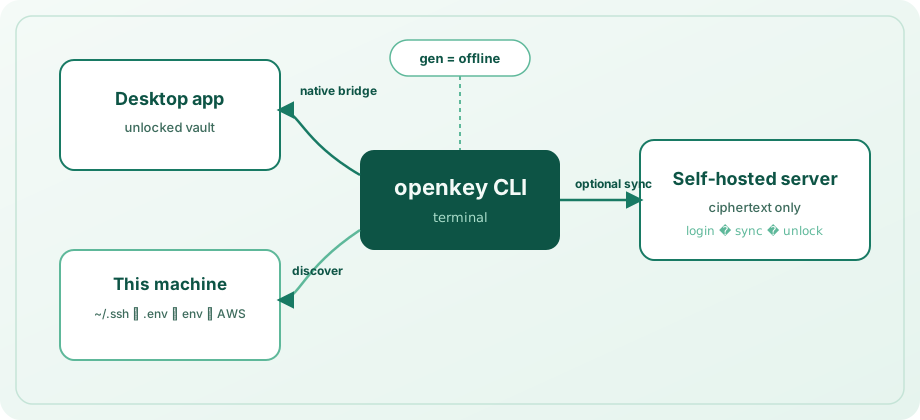
| Mode | आवश्यकता | भूमिका |
|---|---|---|
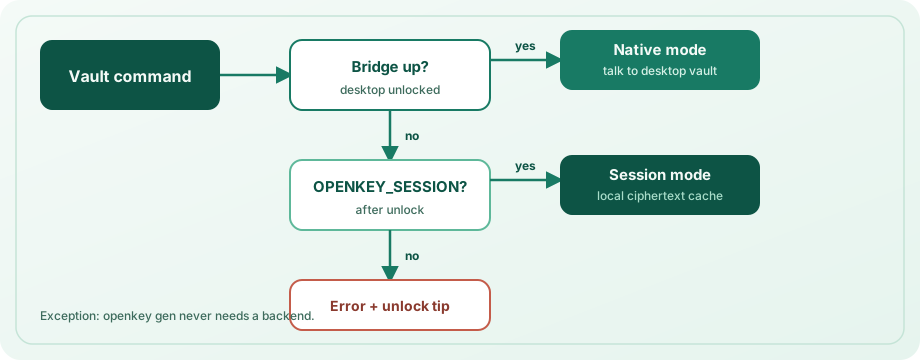
| Offline | कुछ नहीं | openkey gen — नेटवर्क और unlocked vault के बिना cryptographically उपयोगी passwords |
| Native bridge | इस मशीन पर desktop ऐप unlocked | secrets, discovery import, और search के लिए default path — secrets और logins दोनों में |
| CLI session | login + eval $(openkey unlock) | local ciphertext cache और sync जब desktop ऐप उपलब्ध नहीं |
CLI bridge up होने पर उसे प्राथमिकता देती है। अन्यथा OPENKEY_SESSION उपयोग करती है। bridge local-only है और vault locked होने पर काम से मना करता है — desktop session जैसी ही trust boundary।
Offline generation
openkey gen -l 24 --no-symbols
openkey gen -l 32 -a -c          # avoid Il1O0o, copy to clipboard
openkey --json gen -l 20
लंबाई और character classes (--no-upper, --no-lower, --no-digits, --no-symbols) tune करें, या -c से सीधे clipboard में copy करें। ऐप unlock और server registration आवश्यक नहीं।
device group में discovery
openkey discover --dry-run
openkey discover -y
openkey discover -d workstation -p ~/src/acme --depth 3 --no-aws
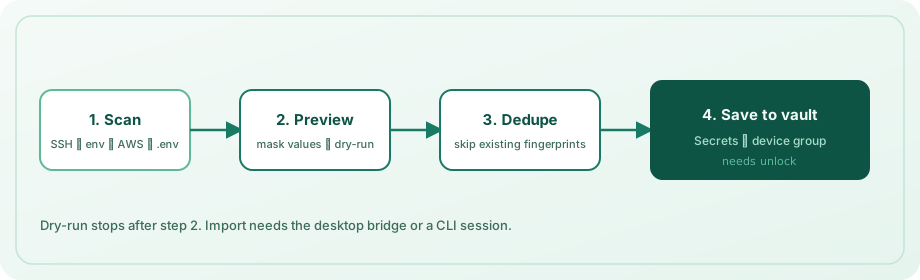
Discovery scan कर सकता है:
~/.sshके तहत private keys (मौजूद हो तो sibling.pubfiles के साथ)- well-known और secret-like process environment variables
- AWS shared credentials
- एक या अधिक project roots से
.env/.env.*trees
परिणाम vault के Secrets section में device label (डिफ़ॉल्ट hostname) के तहत grouped होते हैं। पहले से import values content fingerprint से skip होती हैं। preview के लिए --dry-run; prompt के बिना import के लिए -y। save के लिए अभी भी desktop ऐप unlocked (या CLI session) चाहिए।
रोज़मर्रा के secret operations
Secrets typed records हैं: apiToken (default), sshKey, envSnippet, या other।
openkey secret add --name "GitHub PAT" --kind apiToken --secret ghp_...
openkey secret add -n "deploy" -k sshKey -f ~/.ssh/id_ed25519 \
  --public-key-file ~/.ssh/id_ed25519.pub
openkey secret list
openkey secret get "GitHub"
openkey secret copy ghp
openkey secret rm "old token" -y
List और search values mask करते हैं। plaintext ज़रूरी हो तभी get / copy उपयोग करें। queries name, host, या UUID prefix match करती हैं; ambiguous matches अनुमान लगाने के बजाय candidates list करती हैं।
secrets और login entries एक साथ search करने के लिए:
openkey search github
openkey get "GitHub"
openkey copy api.example.com
वैकल्पिक self-hosted sync
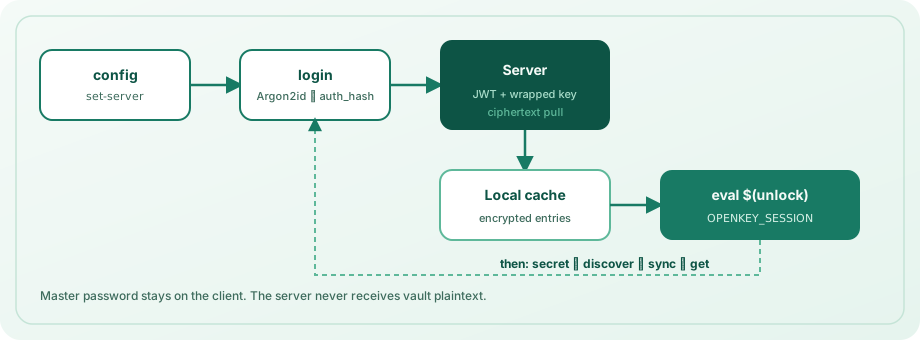
openkey config set-server https://openkey.example.com
openkey login --email [email protected]
eval $(openkey unlock)
openkey sync
eval $(openkey lock)
Login Argon2id से auth_hash derive करता है, मास्टर पासवर्ड कभी flag के रूप में नहीं भेजता, CLI cache में केवल wrapped keys और ciphertext रखता है, और unlock से OPENKEY_SESSION export print करता है (default lifetime 15 minutes; openkey config set-lock से बदलें)। CI के लिए OPENKEY_PASSWORD सेट कर सकते हैं; personal machines पर interactive prompt प्राथमिक।
कभी भी state inspect करें:
openkey status
openkey config show
यह password manager में क्यों है
Developers terminals में रहते हैं। ऐप के समान encrypted Secrets area — और वही ciphertext-only sync API — में लिखने वाली CLI workflow और threat model aligned रखती है। scripts के लिए दूसरा secrets store maintain नहीं करते।
Install
cd openkey_cli
npm install && npm run build
npm link   # optional
Node.js 20+ आवश्यक। पूर्ण command reference, environment variables, config paths, और security notes: CLI guide।