
ब्राउज़र एक्सटेंशन
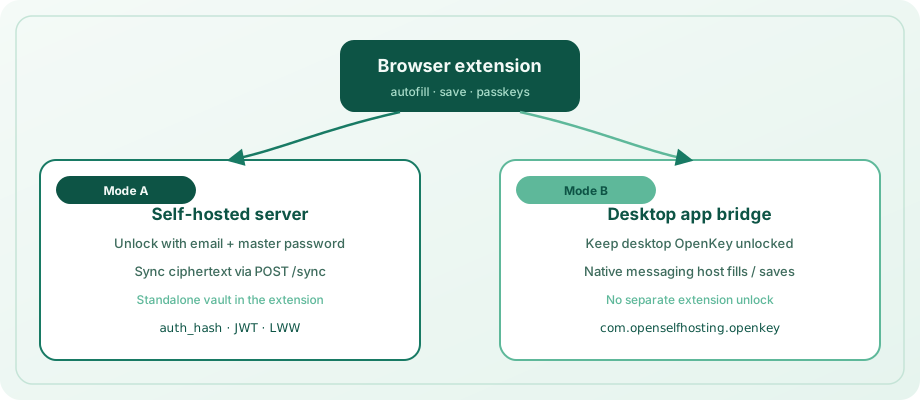
Chrome, Edge, Brave, और Firefox के लिए MV3 extension। यह आपके self-hosted server के साथ unlock कर सकता है (standalone) या unlocked desktop app के ज़रिए fill कर सकता है (native messaging)।
Host name: com.openselfhosting.openkey
यह क्या करता है
- Standalone vault — email + master password से unlock; server से ciphertext sync
- Native bridge — desktop OpenKey app unlocked होने पर native messaging से fill और save
- Autofill — logins और payment cards के लिए overlays, context menu, और keyboard shortcut
- Save / update — पेज से नए logins vault में capture
- Passkeys — WebAuthn
create/getintercept; ES256 credentials store (extension unlocked) - Cards, crypto & secrets — reserved vault areas browse और fill/copy
- Attachments — login के decrypted attachments list और download (standalone)
- Shares & orgs — shares और org invites list/accept/revoke (standalone)
Keyboard shortcut
| Action | Windows / Linux | macOS |
|---|---|---|
| Fill login with OpenKey | Ctrl+Shift+L | ⌘⇧L |
यदि दूसरा extension command claim कर चुका है तो browser के extension keyboard shortcuts में confirm या remap करना पड़ सकता है।
Install (unpacked)
Store listings अभी publish नहीं हो सकती। Locally build और load करें:
cd openkey_extension
npm install
npm run build- Chrome / Edge / Brave:
chrome://extensions→ Developer mode → Load unpacked →dist/चुनें - Firefox:
about:debugging→ This Firefox → Load Temporary Add-on →dist/manifest.jsonचुनें
Popup या Options page से extension ID copy करें — Chromium browsers पर desktop bridge connect करने के लिए ज़रूरी।
Permissions
Extension <all_urls> host / content-script matches उपयोग करता है ताकि autofill, login capture, और passkey interception आपके visit किए sites पर काम करें (open web को fixed allowlist कवर नहीं कर सकता)। Ciphertext sync और unlock आपके डिवाइस या आपके self-hosted server पर रहते हैं; OpenKey page HTML vendor cloud में exfiltrate नहीं करता। Separate extension vault unlock बिना fill चाहिए तो Use desktop app प्राथमिक।
Unlock modes
Self-hosted server
- Popup या Options में Self-hosted server URL सेट करें।
- Create account (register) या Unlock (app के समान email और master password से prelogin + login)।
- Ciphertext
POST /syncसे sync होता है। Master password client नहीं छोड़ता।
Desktop app bridge
- OpenKey desktop app unlock करें।
- Autofill enable / extension connect करें (नीचे platform steps)।
- Extension में Use desktop app चुनें।
Fill और save unlocked app के ज़रिए जाते हैं — उन flows के लिए separate extension vault unlock ज़रूरी नहीं।
वैकल्पिक: air-gapped bootstrap के लिए app में Settings → Browser extension → Copy offline vault link।
Connect native messaging
Windows
Settings → Security खोलने पर openkey_native_host.exe register होता है:
HKCU\Software\...\NativeMessagingHosts\com.openselfhosting.openkey
Chromium के लिए unpacked extension ID लिखें:
%LOCALAPPDATA%\OpenKey\chrome_extension_id.txt
फिर Autofill दोबारा खोलें ताकि host manifest regenerate हो। Firefox [email protected] स्वचालित उपयोग करता है।
Vault unlocked रखें (loopback TCP)।
macOS
Unlock पर OpenKey openkey_native_host.py install करता है और Chrome / Chromium / Edge / Brave / Firefox NativeMessagingHosts folders में manifests लिखता है।
- Unpacked extension load करें और ID copy करें।
- App: Settings → Browser extension → ID paste → Connect extension।
- Vault unlocked रखें → extension: Use desktop app।
PATH पर Python 3 ज़रूरी।
Linux
Settings → Security host manifests लिखता है ~/.config/google-chrome/, Chromium, Edge, और ~/.mozilla/native-messaging-hosts/ में।
Chromium extension ID file:
~/.local/share/OpenKey/chrome_extension_id.txt
फिर Autofill दोबारा टैप करें। Firefox [email protected] उपयोग करता है।
Bridge socket: $XDG_RUNTIME_DIR/openkey-native.sock (vault unlocked रखें)।
Save captured logins
Login submit (या login button / Enter) के बाद in-page banner Save या Update offer करता है:
- Native bridge — unlocked desktop app पर
createEntry/updateEntry - Standalone — locally encrypt और sync से ciphertext push
Same host + username + password ignore होता है; changed password update prompt करता है।
Passkeys
Extension unlocked होने पर OpenKey sites पर WebAuthn handle कर सकता है। In-page dialog confirm करता है; platform authenticator fallback के लिए Use browser चुनें।
Unlock के बाद smoke test: webauthn.io या openkey_extension में npx tsx src/passkey/smoke.test.ts।
संबंधित
- Download & install
- Using the app — Autofill और Browser extension settings
- Server setup
- Security — extension trust boundary