
ব্রাউজার এক্সটেনশন
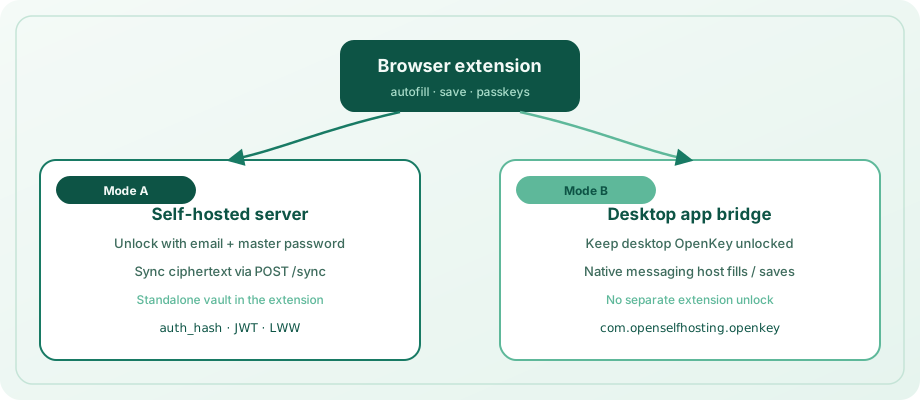
Chrome, Edge, Brave, এবং Firefox-এর জন্য MV3 extension। এটি আপনার self-hosted server-এ unlock করতে পারে (standalone) অথবা unlocked desktop app-এর মাধ্যমে fill করতে পারে (native messaging)।
Host name: com.openselfhosting.openkey
এটি কী করে
- Standalone vault — email + master password-এ unlock; server থেকে ciphertext sync
- Native bridge — desktop OpenKey app unlocked থাকলে native messaging-এ fill ও save
- Autofill — logins ও payment cards-এর overlays, context menu, ও keyboard shortcut
- Save / update — পেজ থেকে নতুন logins vault-এ capture
- Passkeys — WebAuthn
create/getintercept; ES256 credentials store (extension unlocked) - Cards, crypto & secrets — reserved vault areas browse ও fill/copy
- Attachments — login-এর decrypted attachments list ও download (standalone)
- Shares & orgs — shares ও org invites list/accept/revoke (standalone)
Keyboard shortcut
| Action | Windows / Linux | macOS |
|---|---|---|
| Fill login with OpenKey | Ctrl+Shift+L | ⌘⇧L |
অন্য extension command claim করলে browser-এর extension keyboard shortcuts-এ confirm বা remap লাগতে পারে।
Install (unpacked)
Store listings এখনো publish নাও হতে পারে। Locally build ও load করুন:
cd openkey_extension
npm install
npm run build- Chrome / Edge / Brave:
chrome://extensions→ Developer mode → Load unpacked →dist/বেছে নিন - Firefox:
about:debugging→ This Firefox → Load Temporary Add-on →dist/manifest.jsonবেছে নিন
Popup বা Options page থেকে extension ID copy করুন — Chromium browsers-এ desktop bridge connect-এর জন্য প্রয়োজন।
Permissions
Extension <all_urls> host / content-script matches ব্যবহার করে যাতে autofill, login capture, ও passkey interception আপনি যে sites দেখেন সেখানে কাজ করে (open web fixed allowlist কভার নয়)। Ciphertext sync ও unlock আপনার ডিভাইসে বা আপনার self-hosted server-এ থাকে; OpenKey page HTML vendor cloud-এ exfiltrate না করে। Separate extension vault unlock ছাড়া fill চাইলে Use desktop app প্রাথমিক।
Unlock modes
Self-hosted server
- Popup বা Options-এ Self-hosted server URL সেট করুন।
- Create account (register) অথবা Unlock (app-এর মতো email ও master password-এ prelogin + login)।
- Ciphertext
POST /sync-এর মাধ্যমে sync। Master password client ছাড়ে না।
Desktop app bridge
- OpenKey desktop app unlock করুন।
- Autofill enable / extension connect করুন (নিচে platform steps)।
- Extension-এ Use desktop app বেছে নিন।
Fill ও save unlocked app-এর মাধ্যমে — সেই flows-এ separate extension vault unlock লাগে না।
ঐচ্ছিক: air-gapped bootstrap-এ app-এ Settings → Browser extension → Copy offline vault link।
Connect native messaging
Windows
Settings → Security খুললে openkey_native_host.exe register হয়:
HKCU\Software\...\NativeMessagingHosts\com.openselfhosting.openkey
Chromium-এর জন্য unpacked extension ID লিখুন:
%LOCALAPPDATA%\OpenKey\chrome_extension_id.txt
তারপর Autofill আবার খুলুন যাতে host manifest regenerate হয়। Firefox [email protected] স্বয়ংক্রিয় ব্যবহার করে।
Vault unlocked রাখুন (loopback TCP)।
macOS
Unlock-এ OpenKey openkey_native_host.py install করে এবং Chrome / Chromium / Edge / Brave / Firefox NativeMessagingHosts folders-এ manifests লিখে।
- Unpacked extension load করুন ও ID copy করুন।
- App: Settings → Browser extension → ID paste → Connect extension।
- Vault unlocked রাখুন → extension: Use desktop app।
PATH-এ Python 3 প্রয়োজন।
Linux
Settings → Security host manifests লিখে ~/.config/google-chrome/, Chromium, Edge, এবং ~/.mozilla/native-messaging-hosts/-এ।
Chromium extension ID file:
~/.local/share/OpenKey/chrome_extension_id.txt
তারপর Autofill আবার ট্যাপ করুন। Firefox [email protected] ব্যবহার করে।
Bridge socket: $XDG_RUNTIME_DIR/openkey-native.sock (vault unlocked রাখুন)।
Save captured logins
Login submit (অথবা login button / Enter)-এর পর in-page banner Save বা Update অফার করে:
- Native bridge — unlocked desktop app-এ
createEntry/updateEntry - Standalone — locally encrypt ও sync-এ ciphertext push
Same host + username + password ignore; changed password update prompt করে।
Passkeys
Extension unlocked থাকলে OpenKey sites-এ WebAuthn handle করতে পারে। In-page dialog confirm করে; platform authenticator fallback-এ Use browser বেছে নিন।
Unlock-এর পর smoke test: webauthn.io অথবা openkey_extension-এ npx tsx src/passkey/smoke.test.ts।
সম্পর্কিত
- Download & install
- Using the app — Autofill ও Browser extension settings
- Server setup
- Security — extension trust boundary